

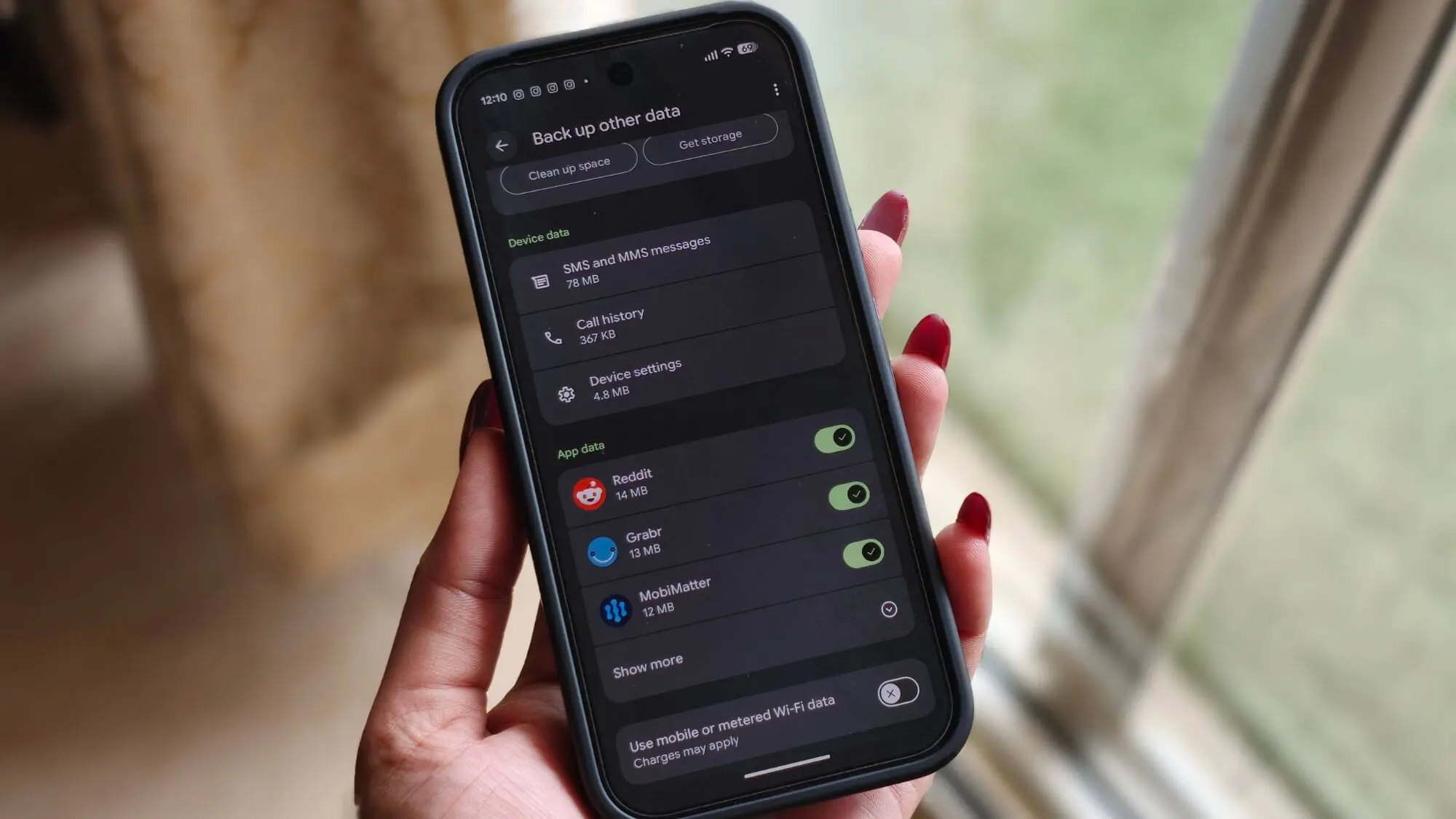
Google has begun notifying Android users via email about a significant change to its backup storage policy, providing a 45-day advance warning before the new rules take effect. The update, which was first spotted in early July as a quiet rollout, will soon make all data included in Android device backups count toward the user's Google Account storage limit. This shift marks a departure from the previous arrangement where only Google Photos uploads and MMS messages consumed storage, while other backup data remained exempt.
Understanding the Policy Change
Starting in approximately 45 days, Android backups will charge users for SMS messages, call history, device settings, app settings, and other previously excluded data types. The change applies to all Android devices that perform automatic backups to Google Drive. Users running Android 9 or later will also gain access to new granular backup controls, allowing them to select exactly which apps and data types are included in backup operations.
The email from Google includes an estimate of how much additional storage each user's backup will consume. For example, one user reported an increase of just 0.03GB (around 30MB), aligning with Google's earlier projection that the average backup size increase would be roughly 40MB. This means the impact will be minimal for most users, though those with many apps or large settings files might see slightly higher numbers.
What Happens If Storage Exceeds the Limit
Google warns that if an account exceeds its storage limit after the change takes effect, automatic Android backups will pause. Users will need to free up storage, upgrade to a paid Google One plan, or disable backups entirely to resume automatic operation. The company recommends monitoring storage through the Google One storage manager, which now provides a dedicated section for Android backup sizes.
New Granular Controls
For devices running Android 9 or later, the update introduces detailed backup controls. Users can now decide which individual apps and which categories of data—such as SMS, call history, or device settings—are backed up. This feature offers greater flexibility for privacy-conscious users or those with limited storage. For instance, someone might choose to back up only essential app data while excluding call logs or SMS to minimize storage usage.
Background and Context
The policy change is part of a broader trend by Google to manage storage more aggressively. In recent years, the company has tightened storage limits for Google Photos, ended free unlimited high-quality photo backups, and introduced the Google One subscription service. By charging for Android backup data, Google is likely encouraging users to either upgrade to paid plans or reduce the amount of data they store in the cloud.
Compared to Apple's iOS backups, which count against iCloud storage and offer similar granular controls, Google's approach is now more aligned with its competitor. Historically, Android backups were a free perk that did not count toward the account limit, making them an attractive feature for storage-sensitive users. The change closes that loophole and forces users to consider their overall cloud storage usage.
User Reactions and Potential Impact
Initial reactions from the Android community have been mixed. Many users appreciate the 45-day notice and the new granular controls, which offer more transparency and control. However, some are concerned that even a small backup increase, when combined with other storage-consuming services like Gmail and Google Photos, could tip them over the 15GB free limit. For heavy users who already struggle with storage, the change may push them toward a paid plan.
Google One offers plans starting at $1.99 per month for 100GB, which could accommodate additional backup data comfortably. The company is also making it easier to manage storage directly from the backup settings page, allowing users to see how much space each app's data consumes and to prioritize what matters most.
Technical Details
The backup data that will now count includes: SMS messages (texts), call history (logs of incoming and outgoing calls), device settings (Wi-Fi passwords, accessibility preferences, display settings), and app settings (in-app preferences, login tokens where applicable). Data that already counts—such as Google Photos original quality uploads and MMS messages—remains unchanged. The new policy does not affect photos backed up in storage saver mode or videos, which continue to be governed by existing rules.
To check how much backup data you currently have, users can open the Google One app or visit the Google Account storage page. A new section labeled "Android backups" shows the total size of all backups across devices. If the backup size combined with other storage exceeds the 15GB free limit, Google will begin counting the extra data after the 45-day period ends.
Historical Context
Google's storage policies have evolved significantly since the early days of Android. Initially, device backups were stored in Google Drive without any storage quota impact, encouraging users to enable backups freely. Over time, as digital storage needs grew, Google began to monetize its services. The end of free unlimited photo storage in 2021 was a major shift, and this latest change continues that trajectory. It also reflects a broader industry move toward subscription-based models for cloud services.
For enterprise and education accounts, the policy may differ. Google typically offers separate terms for Google Workspace and G Suite customers, who have different storage allocations and administrative controls. Consumers on standard free or paid accounts will face the new rules directly.
What Users Should Do Now
With 45 days before the change takes effect, users have time to prepare. First, check your current storage usage and see how much additional space your backup will consume. If the backup size is small, no immediate action is needed. However, if you are close to the 15GB limit, consider deleting old backups, clearing unnecessary app data, or upgrading to a Google One subscription. Alternatively, disable backups for less important apps using the new granular controls to reduce the overall size.
Users who frequently switch devices or factory reset their phones may rely heavily on backups to restore their data. For them, preserving backup functionality is crucial, and a small storage investment may be worthwhile. Those who rarely reset their devices may choose to disable backups entirely and rely on manual app-specific backups.
Long-Term Implications
This change could influence how users approach device management and cloud storage. It may encourage more proactive storage monitoring and reduce the accumulation of unnecessary backup data. Additionally, it could drive adoption of third-party backup solutions that offer more flexible storage options. Google's own Play Store already offers alternatives that back up data to other cloud providers or local storage.
From a privacy standpoint, the new controls give users more power to decide what leaves their device. Excluding sensitive data like call logs or SMS from cloud backups means that information never crosses Google's servers, reducing exposure in case of a breach. This aligns with growing concerns over digital privacy and data sovereignty.
The policy also highlights the ongoing arms race for cloud storage market share. By tightening the free tier, Google aims to convert free users into paying subscribers while maintaining a consistent revenue stream. Competitors like Microsoft (OneDrive) and Apple (iCloud) have similar models, making it a standard expectation for cloud services to charge for storage beyond a basic limit.
In summary, Google's notification marks the beginning of a measured transition. The 45-day grace period provides ample time for users to adjust, and the new granular controls offer flexibility. While the change may inconvenience some, the overall impact is expected to be small for the majority. As the effective date approaches, users are advised to review their backup settings and storage usage to ensure a smooth transition.
Source: Android Authority News